Key takeaways
- An applicant tracking system (ATS) parses your resume into fields such as job titles, employers, dates, and skills. Recruiters then search and filter those fields, so anything the parser cannot read is effectively invisible.
- Use a single-column layout, standard section headings, and real text instead of icons, images, or text boxes. Submit a .docx or text-based PDF unless the posting asks for something else.
- Mirror the exact wording of the job description for skills, tools, and job titles, and back each keyword with a bullet that shows you used it.
- Write bullets as action + task + method + measurable result, and put your strongest match for the role in the top third of page one.
- Test the file before you apply with an ATS checker and a plain-text copy-paste test.
What an ATS actually does with your resume
An applicant tracking system is the database where a company's applications live. Workday, Greenhouse, Lever, iCIMS, SAP SuccessFactors, and Oracle Taleo are common at large employers, and in Bangladesh many employers screen candidates through job-portal dashboards that work in a similar way.
When you upload a resume, a parser pulls out the text and tries to map it into structured fields: contact details, job titles, employers, dates, education, and skills. The recruiter then works from a list of candidates, searches it by keyword (for example "Power BI" or "IFRS"), filters by location or experience, and opens the profiles that look closest to the brief. Many systems now add AI-based matching that ranks applicants against the job description, which makes clean parsing and relevant wording more important, not less.
The popular idea that software silently rejects most resumes before a human sees them is not backed by solid evidence. Most rejections come from three places: knockout questions in the application form (location, notice period, a required degree or license), a keyword search your resume does not show up in, or a quick human skim that does not find the match fast enough. Your job is to make the parser's work easy and the match obvious.
Formatting that parses cleanly
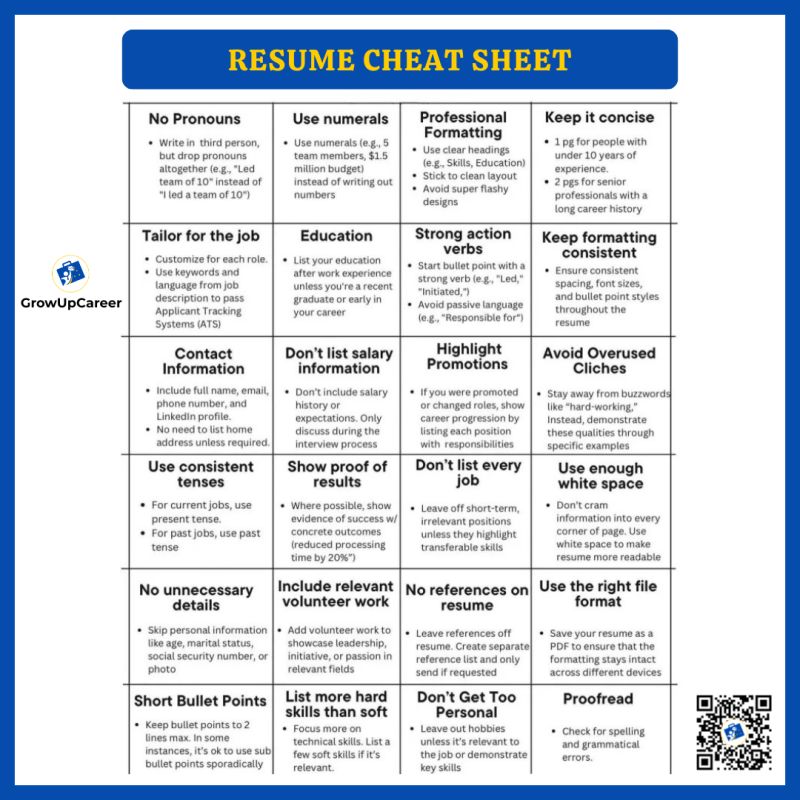
- One column. Two-column templates are often read straight across the page, so your skills list gets mixed into your job history.
- Standard headings. Use Summary, Experience (or Work Experience), Education, Skills, Certifications, and Projects. Creative headings like "My Story" may not map to the right field.
- Real text only. Skill bars, star ratings, logos, and icons contain no readable text. If your phone number sits inside a graphic, the recruiter may never see it.
- Contact details in the body. Some parsers skip document headers and footers, so put your name, phone, email, city, and LinkedIn URL at the top of the page itself.
- Consistent dates. Pick one format, such as "Mar 2023 – Present", and keep it on the same line as each job title and employer. Missing months make tenure harder to calculate.
- Plain fonts and bullets. Calibri, Arial, Aptos, or Georgia at 10.5 to 12 points, with standard round bullets.
- No layout tables or text boxes. They often scramble the reading order.
A note for Bangladeshi and South Asian CVs: leave out the photo, date of birth, parents' names, religion, and marital status when you apply to international or multinational roles. They add nothing for the parser and can introduce bias. Include them only when a local employer explicitly asks for them, and never put your NID or passport number on a resume.
Matching keywords from the job description
- Copy the job description into a document and highlight the job title, hard skills, tools, certifications, and any phrase that appears more than once.
- Split the list into must-haves (the "requirements" section) and nice-to-haves ("preferred" or "a plus").
- Mirror the exact phrasing. If the posting says "Google Analytics 4", do not write only "web analytics". Spell out an acronym once alongside the short form, as in "Search Engine Optimization (SEO)".
- Place keywords where they carry weight: your target title near the top, a grouped skills section, and the experience bullets where you prove them.
- Never hide keywords in white text or paste the job description into the file. Recruiters see the parsed text, and it ends your credibility on the spot.
Job titles matter too. If your official title was "Executive, Business Development" and you are applying for a sales role, writing "Business Development Executive (B2B Sales)" is an honest clarification. Changing it to a title you never held is not.
The bullet formula, with examples
Use this pattern: action verb + what you did + how you did it + the result. Numbers make the result concrete. The figures below are illustrative, so use your own.
| Weak bullet | Stronger bullet |
|---|---|
| Responsible for social media | Planned and published 3 posts a week for a skincare brand's Facebook page, growing monthly reach from 18K to 65K in 4 months |
| Worked on backend APIs | Built 12 REST endpoints in Node.js and PostgreSQL for the order module, cutting average response time from 900 ms to 250 ms |
| Handled customer complaints | Resolved 40 to 60 chat and email tickets a day in Zendesk while keeping customer satisfaction above 90% for 8 months |
| Did an internship at a bank | Reconciled 300+ daily transactions during a 3-month internship at a private commercial bank and flagged 14 mismatches for the operations team |
No exact numbers? Use honest estimates ("about 50 accounts"), team or budget size, or time saved. If you are stuck on wording, the free resume bullet point generator turns a plain duty into a draft you can edit with your real figures.
File type, naming, and length
- File type. Modern systems handle both .docx and text-based PDFs. Follow the posting's instructions, and when there are none, a text-based PDF keeps your layout intact.
- What to avoid. Scanned PDFs, photos of a printed CV, password-protected files, and heavily designed templates exported from design apps.
- File name. Use something like Nusrat-Jahan-Resume.pdf, not "CV final new (2).pdf".
- Length. One page for students, freshers, and most people with under five years of experience. Two pages are fine for experienced professionals if every line earns its place.
- Auto-filled forms. When a portal fills in fields from your resume, check every field and fix errors by hand. That parsed version is what the recruiter sees.
Test before you apply
- Run the file and the job description through the free ATS resume checker and review missing keywords and parsing warnings.
- Do the plain-text test: open your PDF, select all, copy, and paste into Notepad or TextEdit. If sections come out of order, text is missing, or bullets turn into odd symbols, the ATS is likely seeing the same thing.
- Hand the printed page to a friend for ten seconds and ask what job you are applying for. If they cannot tell, rework the top third.
If you are getting views but no interviews, compare your file against the patterns in why resumes get rejected, or have a specialist rebuild it through our ATS resume and CV writing service.
FAQ
Do I need a different resume for every application?
You need a tailored version, not a new resume. Keep a master resume with everything, then adjust the headline, summary, skills order, and three to five bullets for each role.
Is a PDF or a Word file better for ATS?
Both parse well in modern systems as long as the PDF contains real text rather than a scanned image. Follow the posting's instructions, and default to a text-based PDF when there are none.
Can I use a Canva or two-column template?
Not for online applications. Keep a single-column version for portals and email, and use a designed version only for job fairs or when a hiring manager asks for one directly.
Should I include a photo on my resume?
Not for roles in the US, UK, Canada, Australia, or most multinational companies. Some local and Gulf employers still request one, so include it only when the posting asks.